


“Sunlight-Readable” has no industry standard, so anyone can make that claim
Many sellers of drone monitors, workstations, and controllers call their displays “sunlight-readable,” often at a maximum brightness of 1,000 or 1,500 nits. There is no industry standard defining the term, so each manufacturer decides for itself what qualifies.
Making a screen truly readable in sunlight adds cost, weight, complexity, and power draw. So it’s no surprise the label gets applied optimistically. Manufacturers do the bare minimum to get their product to market. But, let’s be honest, a lower price is always appealing to the consumer. The question becomes, “Is it worth it?”
This article covers what actually makes a display readable in direct sun. The answer to the question above should then become obvious.
I’ve kept it focused on concepts rather than equations. I’m happy to get into the physics, but you don’t need that to follow the argument.
Nits 101: How bright is 1,000 nits, really?
“Nits” measures how much light a screen emits, and it’s the number manufacturers quote. For reference:
- Typical laptop: ~250 nits
- Decent TV: ~400 nits
- Recent flagship smartphones: 1,000+ nits
- “High-brightness” monitors: 1,000–1,500 nits
- Brytee monitors: 2,500 nits minimum
Compared with older consumer displays, 1,000–1,500 nits is a real improvement, and it’s fair to call it “high brightness.”
But high brightness and sunlight-readable are not the same thing. To see why, you have to look at what the screen is competing against.
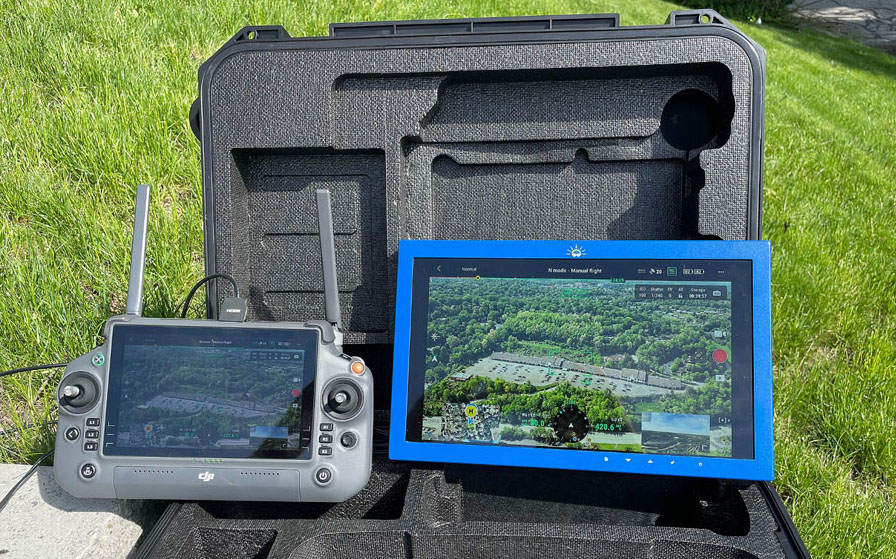
Direct sun is about 200× brighter than a bright indoor room
Screen brightness is measured in nits. But the illuminated brightness of a room or other environment is measured in lux. Here’s how common lighting environments compare:
| Environment | Typical Light Level |
|---|---|
| Living room (daytime) | 150–300 lux |
| Home or commercial office (daytime) | 300–500 lux |
| Next to a sunny window | 1,000–5,000+ lux |
| Outdoors, direct noon sun | 100,000–120,000 lux |
Most displays are designed for the top half of that table. Take them into the bottom row and they’re working in light roughly 200 times brighter than a well-lit office. That’s why you can’t see your phone, laptop, or tablet outside.
This is also where brightness stops being the whole story. With that much light hitting the screen, the real problem is how much of it bounces back at you.
The 3 factors that make a display truly sunlight-readable
Brightness gets you in the game, but two further design choices often decide whether you can actually see the image in direct sunlight:
- Brightness: the screen has to emit enough light to begin with (2,500+ nits).
- Optical design: every transparent layer between your eye and the image on the screen reflects sunlight. Optical bonding eliminates the internal reflections.
- Front surface finish: an anti-glare (AG) texture keeps background scenery from showing up as reflections on top of your image.
We covered brightness above. The next two sections cover the factors most spec sheets leave out.
Factor 2: Every layer of glass reflects sunlight back at you
An image is produced inside a display cell, and that cell has to be transparent or you’d see nothing. But any transparent surface, glass or plastic, reflects back about 4% of the light that hits it.
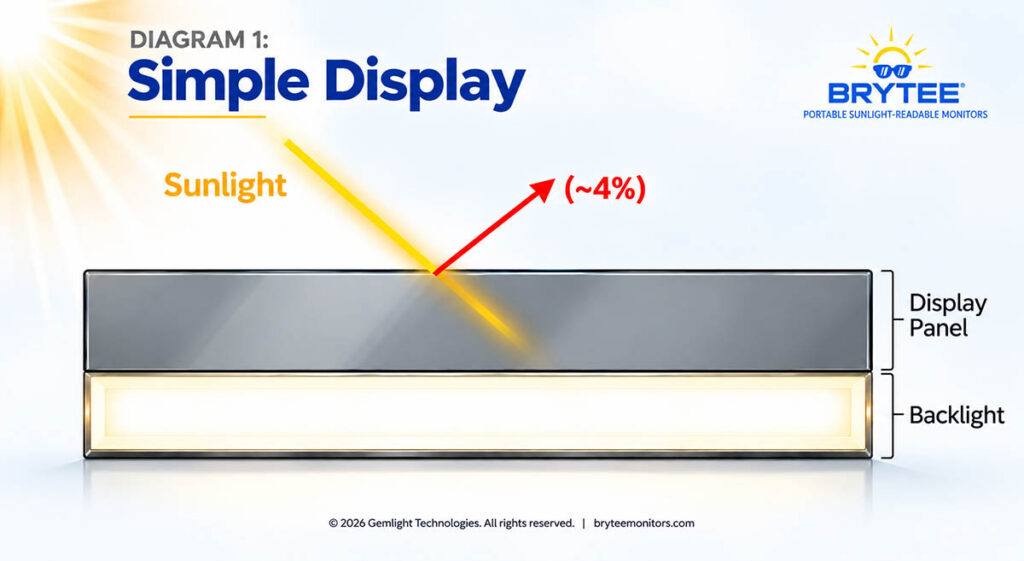
Indoors, 4% is negligible. In direct sun, it isn’t:
- One reflective surface (the display itself): about 4% reflection, or 1,250+ nits of reflected glare [Diagram 1]
- Add a protective cover glass: each cover adds two more reflective surfaces, front and back, for about 12% total reflection, or 3,800+ nits of glare
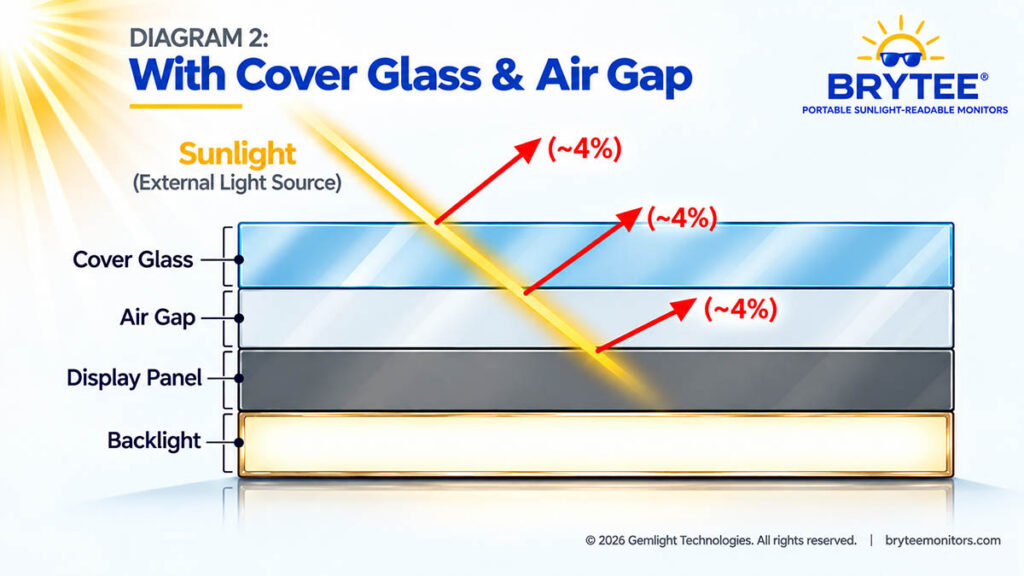
Compare those numbers with the screen itself. A 1,200-nit display with a standard cover is competing against roughly three times its own brightness in reflected sunlight.
The image washes out, and you end up squinting, shading the screen, or moving it around to find an angle that works.
Optical bonding removes the hidden internal reflections
Most displays have a thin air gap between the cover glass and the display panel. This air gap is the cause of the added reflected glare. Optical bonding fills that gap with a clear optical adhesive. With the air gap gone, the two inner surfaces (the back of the cover glass and the front of the display) stop reflecting almost entirely.
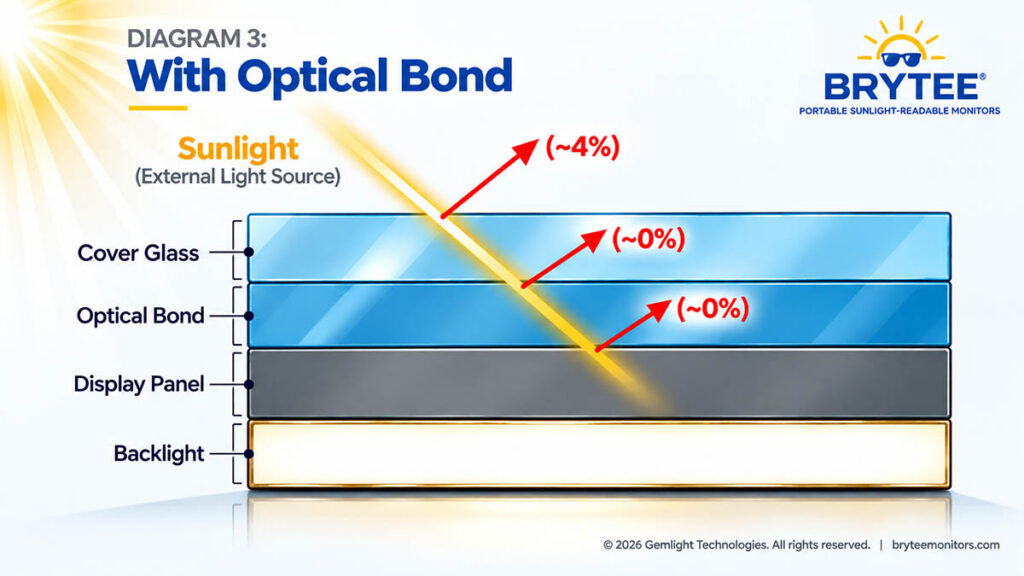
The result is a protective cover with close to zero optical penalty. You keep the durability without adding glare.
Is an anti-reflective (AR) coating required? Usually not.
That still leaves the outer surface’s ~4% reflection. Anti-reflective (AR) coatings can reduce it, but they add cost and they often shift the color of the displayed images. In our experience, a display with optical bonding can often achieve true sunlight readability without AR, so we treat it as an option rather than a requirement.
Factor 3: An anti-glare (AG) finish stops the background from competing with your image
The last factor is the texture of the front surface. There are two basic choices:
- Glossy (mirror-smooth): reflects a sharp image of whatever is behind you, such as sky, buildings, railings, or your own face [note Diagrams 1–3].
- Anti-glare (AG, lightly textured): scatters those reflections so they blur into an even haze.
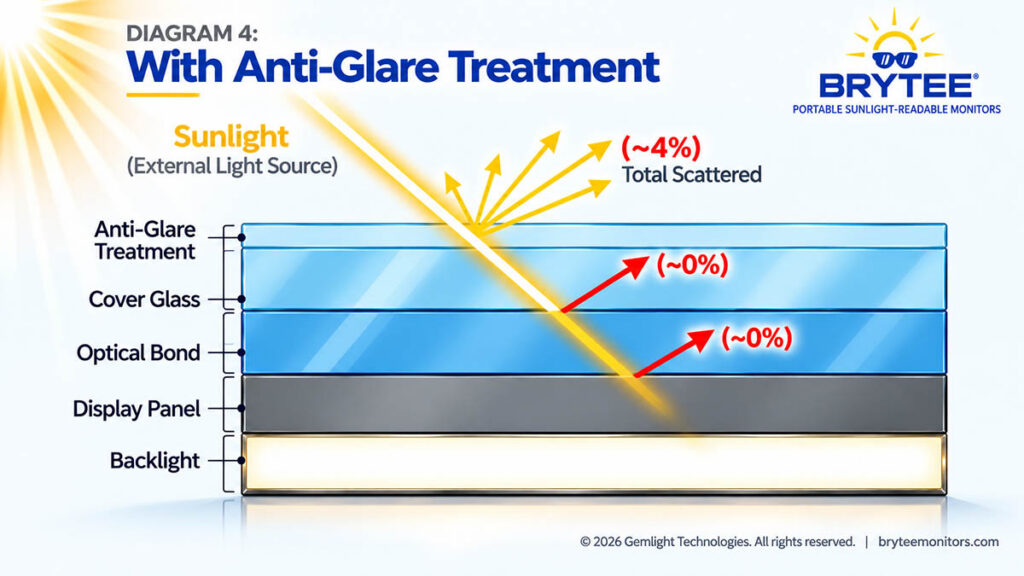
An AG finish doesn’t reduce the amount of reflected light. It scrambles the reflected shapes so your eye stops picking them out. Your brain then only has the screen image to process, (i.e., your feed), instead of your feed plus a mirror image of the scene behind you. This type of glare is largely responsible for eye fatigue.
The best approach is just enough texture to break up background reflections without softening the display image.
Side-by-side: What these factors look like in direct sun
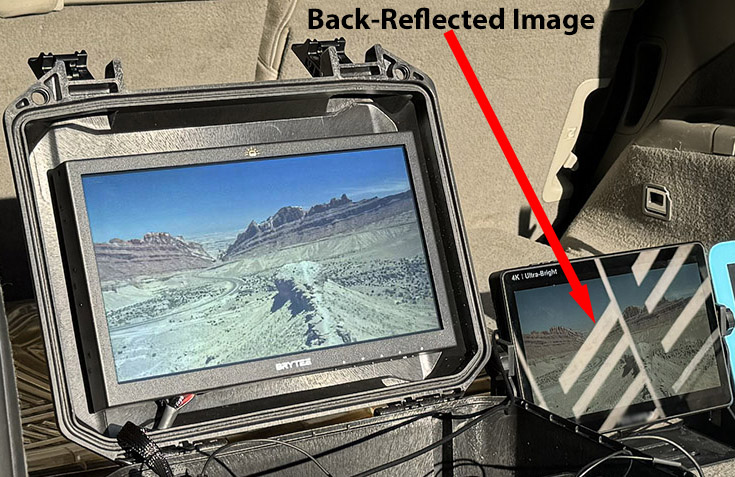
Anti-glare vs. glossy (morning/afternoon sun). In this first photo, both outdoor monitors show the same image, and both manufacturers call them sunlight-readable. The monitor on the right has no AG finish, and a railing in the background is clearly reflected across its screen, making the image much harder to read. Compare that to our Brytee monitor on the left.
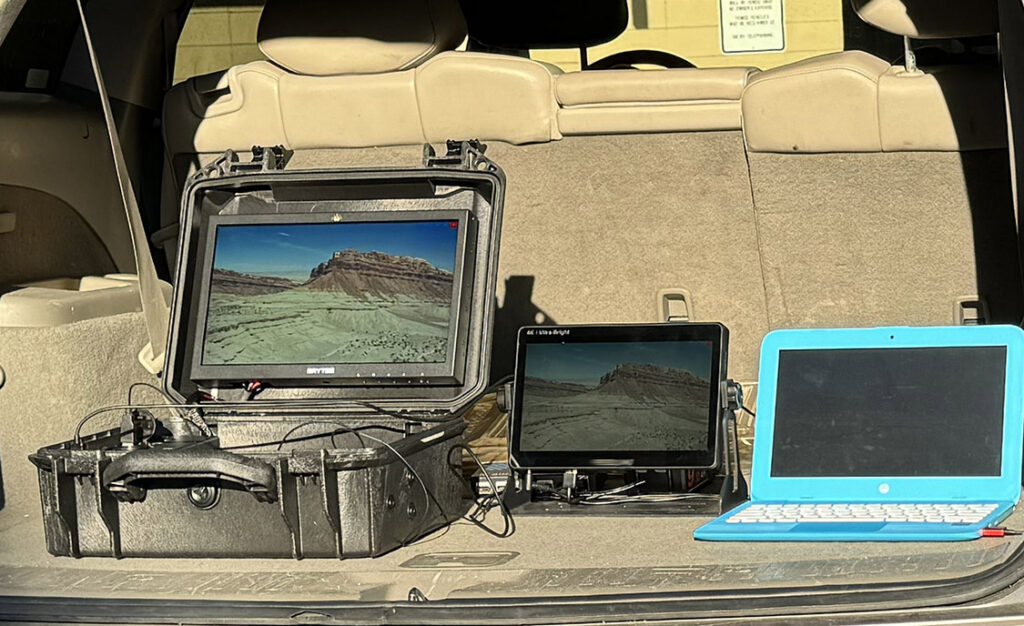
In the second photo below, you see three displays set at maximum brightness in full direct sun.
- Right, standard laptop: essentially invisible.
- Middle, what they call a 2,000-nit monitor (it’s not; we measured it) with no optical bonding or surface treatment: brighter, but still washed out.
- Left, the optically bonded Brytee monitor with an AG front surface (no AR). It’s clearly readable.
Notice that the middle monitor which is rated at 2,000 nits, well above the standard 1,000 to 1500-nit sunlight-readable claims, still struggles.
Conclusion? Brightness without optical design doesn’t solve the problem.
The real test of sunlight readability: Can you work without hiding from the sun?
Photo 2 above shows the problem. A 1,000 to 1500-nit display can be competing against 1,250–3,800+ nits of reflected glare before background reflections are even considered. That is why an impressive sounding brightness specification sheet doesn’t necessarily translate into a clearly readable image in direct sunlight.
And this is where the definition of “sunlight readable” really matters.
A screen doesn’t become truly sunlight readable simply because you can make out the image outdoors. If you have to change where or how you work in order to see it, the display is still imposing limitations on the operation. How is that sunlight readable?
So for professionals, the more useful question isn’t just “Can I see my screen?” It’s “How much time, effort, and accuracy does my screen cost me?”
We often hear that a high-bright monitor is “good enough.” But look at what operators may have to do to make it good enough – they hide from the sun.
A drone video feed changes constantly, and decisions happen in real time. Every second spent shading the screen, changing position, or squinting to distinguish a target from a reflection is attention taken away from the mission.
In inspection, public safety, or military operations, that cost can show up as missed detail, slower decisions, restricted positioning, and more fatigue over a long shift.
That’s the practical difference between a display that can be used outdoors and one designed to remain readable there.
A field monitor shouldn’t force you to work around the sun. It should let you work in it.
Understanding that difference makes it much easier to evaluate the many displays now marketed as “sunlight readable.” Instead of relying on the label—or any single specification—look at how the display is actually engineered and how it performs in the conditions where you’ll use it.
What to ask before you buy a “sunlight-readable” display
- What is the maximum brightness in nits? Look for 2,500+ for direct-sun use.
- Is the display optically bonded? If there’s an air gap behind the cover glass, expect significant glare.
- What is the front surface finish? Anti-glare, glossy, or AR-coated?
- Has it been demonstrated in direct midday sun? Ask for photos or a demo, not just a spec sheet.
Built for the sun, not adapted to it
Brytee was developed from the ground up to solve this problem. We didn’t start with an off-the-shelf monitor and try to make it work outdoors. We engineered the display itself for professional field use, combining 2,500+ nits of brightness with optical bonding, reflection control, engineered glass, thermal management, battery power, and the ruggedness needed to operate where the work happens